
Resident Center
BuildiumHouse & Home
4.61.60K Reviews
- Version
- 1.5.19
- Installs
- 500.00K
- Age Rating
- Everyone
Screenshots
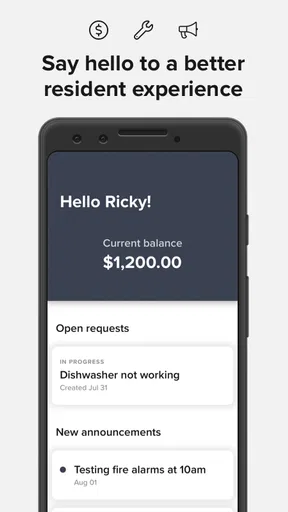
Our Review of Resident Center
 Analysis by Appyee
Resident Center is the kind of house and home app I would recommend when the goal is to keep resident tasks in one place rather than chase updates through separate messages, emails, and paper notices. Developed by Buildium, it is free to use and aimed at an Everyone audience, with a deliberately simple approach that makes sense for people who want a straightforward resident portal instead of another complicated service dashboard.
My first impression is that its value depends less on entertainment or customization and more on whether your property manager uses the Buildium system effectively. When that connection is in place, the app can become a practical daily reference point. When it is not, there is little reason to install it just because the app itself is available. That distinction is important: Resident Center is not a general home-management tool for anyone, but a resident-facing app tied to a particular housing workflow.
How Resident Center feels during everyday use
The strongest part of the experience is the sense of having a single starting point for resident-related information. I find that especially useful when I need to check something quickly between other tasks. Instead of remembering which message contained a notice or whether I already reported an issue, a dedicated resident portal gives those interactions a clearer home.
The design intention is simplicity, and that shows in the overall role of the app. It is not trying to be a social network, a budgeting suite, or a general-purpose smart-home controller. That narrower purpose is a benefit for users who dislike crowded interfaces. You are less likely to open it looking for unrelated tools, and more likely to understand that it exists for communication and practical housing administration.
There is also a useful psychological advantage to separating property matters from personal messaging. A maintenance concern, a question for management, or an important resident update can be handled in the place where you expect to find it later. I would still keep personal notes for urgent matters, but the app is better suited to creating a consistent record than relying on memory.
Speed expectations and the first few minutes
In normal use, I would judge Resident Center by how quickly it gets me to the relevant resident task, not by whether it feels like a high-performance entertainment app. A resident portal has a different standard: the screen should be understandable, the path should be short, and the app should not make routine questions feel like an administrative project.
The simple positioning works in its favor here. There are fewer reasons to browse aimlessly, so the app’s usefulness comes from focused visits. I would open it when I have a specific purpose, such as checking a property message or following up on something already raised. That makes perceived speed partly a matter of organization. A clean route to the right information can feel faster than a feature-heavy alternative, even when both require similar loading time.
One practical habit improves the experience: before contacting management, I would first review the existing information in the resident portal and gather the exact details of the issue. That avoids sending several partial messages. It also makes the app more useful as a communication checkpoint rather than merely a button for starting another conversation.
The app has been available since August 7, 2019, and its current version is 1.5.15. Those details tell me that this is an established resident product rather than a brand-new experiment, but they do not change the need to judge it against your property’s actual setup. A polished portal cannot compensate for incomplete or outdated information supplied by the management side.
What happens during heavier use
Resident Center is unlikely to be an app I leave open for long periods. Its heavier moments are more realistic when several resident tasks arrive close together: reviewing a notice, checking an existing request, and preparing another message in the same session. In that situation, the important question is whether the experience remains clear as I move between tasks.
I would approach those moments methodically. First, I would read the property communication fully, then separate information that requires action from information that is only for reference. After that, I would deal with the most time-sensitive item and leave a clear description for anything that needs management attention. This workflow reduces repeated searching and helps prevent two requests about the same matter.
A less obvious trade-off is that a centralized portal can make you more organized, but it can also encourage overreliance on one channel. For a routine matter, that is convenient. For something urgent involving immediate safety, water damage, loss of access, or another situation that cannot wait for normal administrative handling, I would use the property’s established urgent contact method instead of assuming an app message is enough. Resident Center is best treated as a resident-management workspace, not as an emergency service.
Another useful approach is to keep descriptions precise. Rather than writing that something is “not working,” I would include where the problem occurs, when it started, what I already tried, and whether it affects only me or a shared area. The app does not need to be flashy to support better communication; the quality of the information entered often determines how much value the workflow produces.
Reliability, continuity, and recovery
For a housing app, reliability means more than avoiding crashes. I want to feel confident that I can return later and understand what has already been communicated. Resident Center’s focused purpose makes that kind of continuity more important than visual novelty. If I use it as the central place for resident matters, I expect to be able to resume a task without reconstructing the whole story from memory.
My advice is to check the result after any important action. If I submit or send something, I would look for a visible indication that the action completed and keep any relevant reference details in my own notes. That is not a criticism unique to this app; it is sensible practice whenever a digital portal is being used for a matter that affects the home.
Recovery is also easier when I avoid making the app my only record of urgent information. I would retain key contact details separately and save important dates or appointments in my regular calendar. Resident Center can organize the resident relationship, but personal backup habits protect me if I am temporarily without access to the app, the device, or the account connected to the property.
The app’s reception is encouraging: it holds an average rating of 4.5 from around 24 thousand ratings, with about 1.5 thousand written reviews. I read that as evidence that many residents find the basic concept useful, although ratings cannot guarantee that every building or management company will provide the same quality of experience. The human side of the service still matters enormously.
Device constraints and who should think twice
Resident Center requires at least iOS or Android version 12, so the first question is whether the phone or tablet you plan to use meets that requirement. For people with a reasonably current device, this should be a manageable condition. For anyone keeping an older phone specifically to control household costs, compatibility deserves attention before depending on the app for resident communication.
The application is free, which removes one obvious barrier. Still, “free” does not mean it is useful independently of a participating property. I would not install it expecting to create a universal landlord directory, manage a privately owned home, or replace every household service. Its usefulness begins when it connects to the resident relationship that the property manager has established through Buildium.
Resource demands are best considered in proportion to the app’s purpose. Since this is a focused portal rather than a media-heavy application, I would expect short, task-based sessions to be the normal pattern. I would not keep it running continuously just to check for updates. Opening it when needed is a more sensible routine and avoids turning a simple administrative tool into another source of background distraction.
People who prefer a desktop browser, phone calls, or direct email may also find the app unnecessary. A portal is helpful when it reduces scattered communication; it is less helpful when it adds another place to monitor without replacing anything else. If your management team still handles every matter through a different channel, the app may feel like duplication rather than simplification.
Useful workflows beyond the obvious
One of the best ways to get value from Resident Center is to treat it as a timeline for housing responsibilities. I would review it at a regular interval rather than only when something goes wrong. A quick check can help me notice a property update before it becomes a last-minute surprise, especially when my household includes other people who may not see every message.
A second workflow is to use the app as a handoff tool. If I am away and another household member needs to deal with a property matter, I can explain where the relevant resident information belongs instead of forwarding a confusing chain of personal messages. That does not eliminate the need for clear communication, but it gives the household a shared reference point.
A third insight is that the app can help distinguish an individual problem from a building-wide one. When a notice or update concerns the wider property, I would read it before assuming that my own unit is the only one affected. That small pause can prevent duplicate reports and help me describe the situation more accurately when an individual follow-up is still necessary.
I would also use a simple “open, act, verify” routine. Open the app with one purpose, complete the relevant action without mixing unrelated requests, then verify what was recorded. This is particularly useful for users who find portals confusing. It turns the app from a place to browse into a short checklist, which matches its practical character much better.
How it compares with familiar alternatives
Compared with email, Resident Center offers a more dedicated home for resident matters. Email is flexible and familiar, but important details can disappear among newsletters, receipts, and unrelated conversations. A property portal is usually easier to revisit when I need context. The trade-off is that email works with almost anyone, while Resident Center depends on the property’s participation and setup.
Compared with phone calls, the app is better for non-urgent matters that benefit from a written trail. A call can be faster when a situation needs immediate clarification, but it may leave me without an easy record of what was discussed. I would choose the app for routine communication and use a call when tone, urgency, or back-and-forth explanation matters more than convenience.
Compared with paper notices, a digital portal is easier to consult when I am away from home and less likely to get misplaced. Paper can still be useful for people who do not regularly use smartphones, so I would not assume the app should replace every traditional communication method. The best option depends on whether everyone in the household can access and understand the digital channel.
Compared with a generic task-management app, Resident Center has a more relevant context for property-related matters, but it is not meant to organize every household chore or bill. I would use a general planner for cleaning schedules, shopping, and personal reminders, while keeping property communication in Resident Center. Trying to force it into a broader role would make its narrow focus feel like a weakness.
Who will benefit most from it
I think Resident Center is a strong fit for renters or residents whose management company actively uses Buildium and wants a central digital channel. It is especially suitable for people who regularly need to check property communications, keep track of resident issues, or avoid searching through old messages for basic context.
It can also help households where responsibility is shared. One person may notice a problem, another may be available to follow up, and everyone benefits from having a clearer place for the property conversation. The app does not solve household coordination by itself, but it gives that coordination a more appropriate setting than a private text thread.
I would be more cautious about recommending it to someone who has no relationship with a participating property, rarely uses mobile apps, or needs immediate human assistance for every issue. Those users may be better served by direct management contact or a traditional process. Likewise, residents with an older device should check the operating-system requirement before making the app part of their routine.
My performance verdict
After looking at Resident Center as a practical tool rather than a feature showcase, I see its main strength in focus. It is free, aimed at everyone, and supported by Buildium as a dedicated resident portal. Its audience is already substantial, with over 500 thousand installs, which fits the idea that many people use it as part of their housing administration rather than as an occasional novelty.
Its limitations are equally clear. The experience depends on the property manager’s participation, the quality of the information being maintained, and the user’s willingness to treat a portal as part of a communication routine. It is not the best replacement for urgent contact, a universal home organizer, or a solution for people whose building does not use the service consistently.
For me, the performance verdict is favorable when the app has a real job to do. I would install it if my property uses Buildium, keep my device compatible with the minimum operating-system requirement, and use short, deliberate sessions instead of expecting a constantly active dashboard. If that matches your situation, the biggest benefit is less scattered resident communication, not a long list of extras.
In the end, Resident Center is most convincing when it quietly removes friction from ordinary housing tasks. I would recommend it to a friend who wants a clearer resident-management channel and whose property already supports it. I would skip it for a home that has no Buildium connection or for emergencies where a direct contact method is more appropriate. Used within those boundaries, it is a sensible, focused addition to the everyday tools of managing a place to live.
Privacy and Permissions
See what permissions an app requests and how it handles your data.
- Location
- approximate location (network-based), precise location (GPS and network-based)
- Camera
- take pictures and videos
- Microphone
- record audio
- Wi-Fi connection information
- view Wi-Fi connections
- Other
- view network connections, full network access, control vibration, prevent device from sleeping
Verdict
Strengths of Resident Center
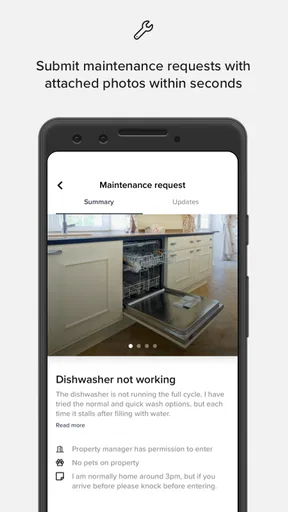
- Quickly submit maintenance requests with photos and status updates.
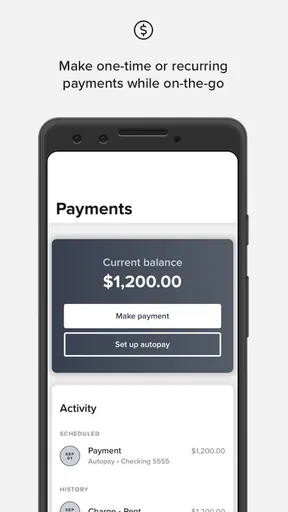
- Pay rent and view payment history directly from the mobile app.
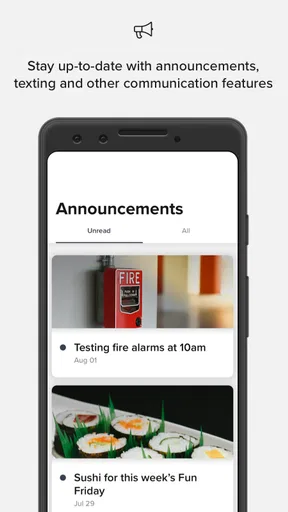
- Receive important property announcements and community messages.
- Access lease details, documents, and account information in one place.
- Convenient way to contact property management without calling the office.
Limitations of Resident Center
- Features depend on whether your property management company supports the app.
- Some users may experience delayed notifications or message updates.
- Payment processing fees may apply to certain payment methods.
- The interface can feel limited compared with full property management websites.
- App usefulness is reduced if your landlord rarely updates information.
Similar Picks in This Category
View All
Universal TV Remote Control
CodeMatics Media Solutions3.9

AlfredCamera Home Security app
Alfred Systems Inc.4.7

Planner 5D: AI Home Design
Planner 5D4.5

Universal Tv Remote-Cast to TV
One Music Player4.1

Zillow: Homes for Sale & Rent
Zillow Group4.8

99acres Buy/Rent/Sell Property
infoedge.com4.3
Frequently Asked Questions
What is Resident Center, and what can I use it for?
Resident Center is a community and property-management app designed to help residents communicate with their property management team and stay informed about their building or community. Depending on the property’s setup, you may be able to pay rent, submit maintenance requests, receive announcements, view documents, manage deliveries, and access community features from one place. Available tools can vary between properties.
Do I need an invitation or account from my property management company?
Yes, in most cases you need to be connected to a property or community that uses Resident Center. Your property management company may send an invitation, provide an activation link, or ask you to register using the email address or phone number associated with your lease. If you cannot sign in, your management office usually needs to verify your information or resend the invitation.
Can I pay rent and other charges through Resident Center?
Many Resident Center communities allow residents to make rent payments and handle certain additional charges through the app. Available payment methods, processing fees, recurring-payment options, and payment deadlines depend on the property manager and the account configuration. Before confirming a transaction, carefully review the total amount, convenience fees, payment date, and confirmation details shown in the app.
How do maintenance requests work in the app?
If maintenance services are enabled for your property, Resident Center can provide a convenient way to report problems without calling the management office. You can generally describe the issue, select a category, attach photos, and submit the request for review. The app may also display status updates or messages, although response times and scheduling are controlled by the property’s maintenance team.
Is Resident Center free, and is my personal information secure?
Downloading Resident Center is generally free for residents, but some transactions, such as online rent payments, may include fees determined by the property management company or payment provider. The app may process sensitive information related to your account, payments, lease, and residence, so use a strong password, keep the app updated, and avoid sharing login details. Review the current privacy policy before registering.
